
What is a Text activity?
Text activities can be used to insert an instruction for the learner to action and then confirm completion by clicking the 'Mark as Complete' button. E.g. a classroom workshop or ride-a-long where the learner would mark as complete once attended, or to meet with their manager and mark as complete once the meeting has taken place.
The reason you would use a text activity is in situations where the learner is required to complete an action and then confirm that they have done so.

How Text activities look in the front-end
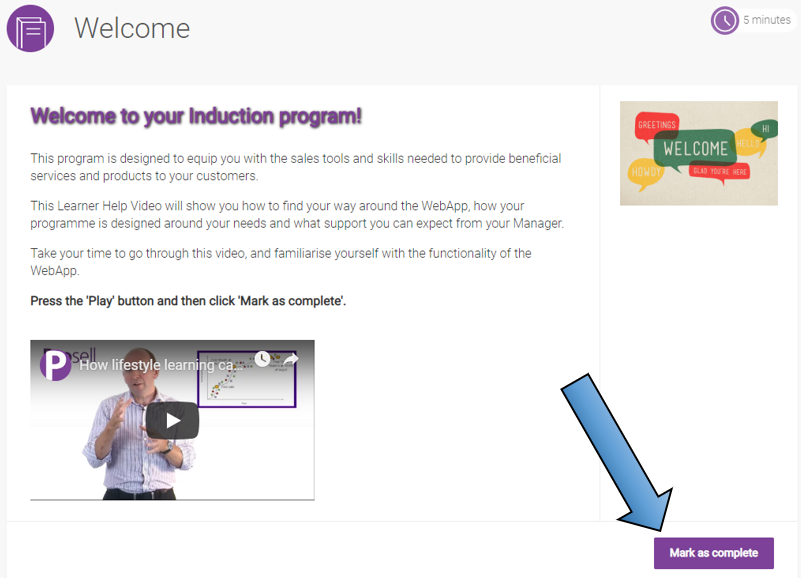
When a text activity is opened by a learner, it first lands on the overview screen (as is the same for all activity types). This contains the synopsis which will contain guidance for the learner on what is required to complete the activity. This could be to attend a workshop, watch an embedding video, or even just to read the information given within the synopsis.
A text activity is completed simply by the learner clicking the 'Mark as complete' button that is positioned in the bottom right-hand corner.
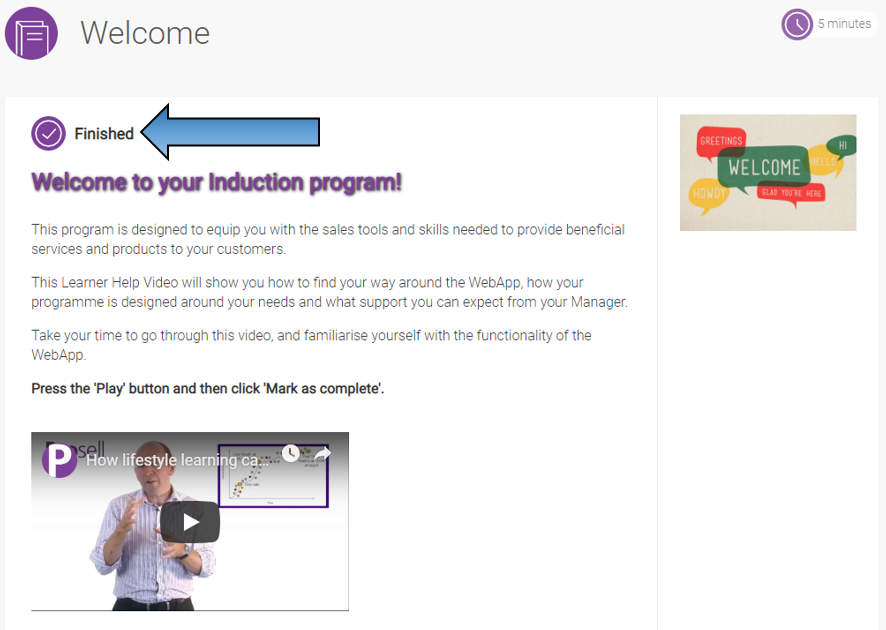
Once the button has been clicked, the status of the activity will change to 'Finished'.
Comments
0 comments
Please sign in to leave a comment.