
The activity repository is an additional service, meaning it is not included in the basic licence package. If you do not have visibility of this in your curriculum and believe this would be useful for your programs, then please get in contact – onboardhelpdesk@prosell.com.
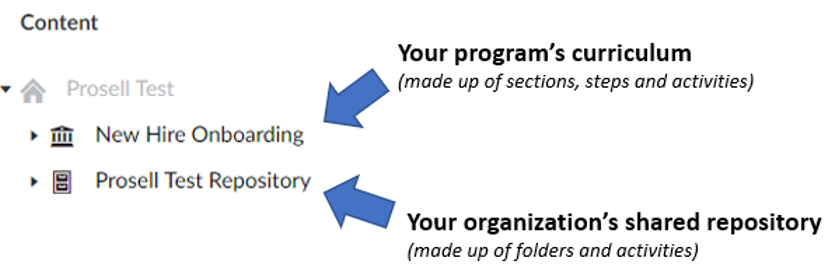
The key benefit of the feature is that it enhances the content building experience. It can feel overwhelming at first when you are faced with a blank curriculum and are not sure where to start, or if you have begun building but have run out of ideas for engaging activities.
The activity repository is a shared space that can be accessed through each of your programs. It can be used as a holding area as it is made up of folders that activities can be placed within. How it is used might depend on the structure of your organization and whether you have the same administrators for each of your programs.
If you have programs belonging to different administrators, then you can send best practice activities to the repository into the relevant folders that you think might be of interest to them as they will be able to retrieve the activity copy for use in their own program. In the same way, other administrators might have shared some of their activities that you could benefit from.
If you are the administrator for multiple programs you can send activities here to be re-used in your other programs.
Sending Activities to the Repository
You can share your best activities with others by sending a copy of them to the repository.
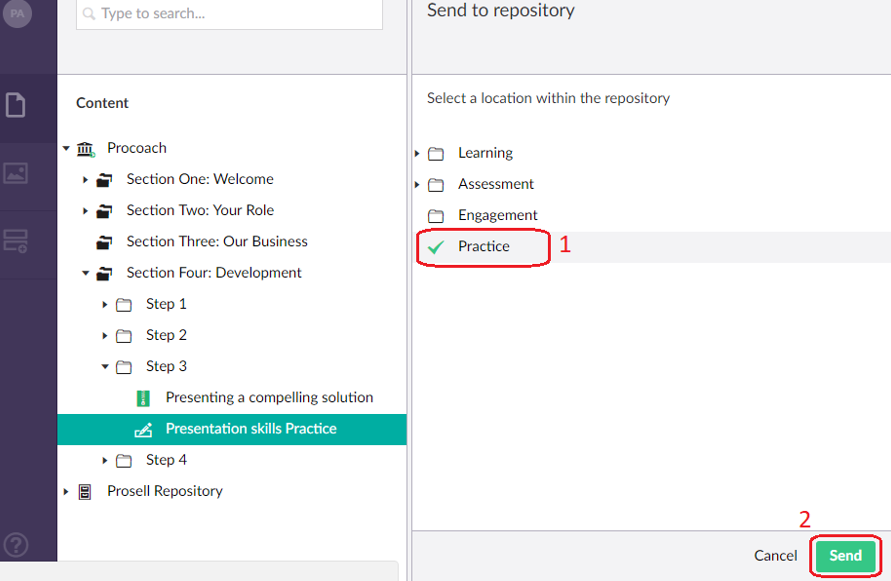
Do this by selecting the activity in your curriculum structure, clicking the ‘Actions’ dropdown in the top-right corner, and then ‘Send to repository’.

You will then be presented with a list of the folders within the repository and you should then choose the category that your activity is best suited to. Once you have selected the folder, a green tick will appear, and you can then press ‘Send’.
It is only a copy of the activity that is sent to the repository and therefore any edits to the activity made by others will not affect your version.
When an activity is sent to and taken from the repository, most of the content fields are copied across with it, such as the synopsis, thumbnail and related documents. However, some are not: Gateway, Critical Learning Activity, Approvals and Icon.
Adding a comment to an activity
You can add comments to each activity that you build, where you can enter details about that activity that only administrators can see (not visible to front-end users). You can access this by going to the 'Notes' tab beneath the activity title.
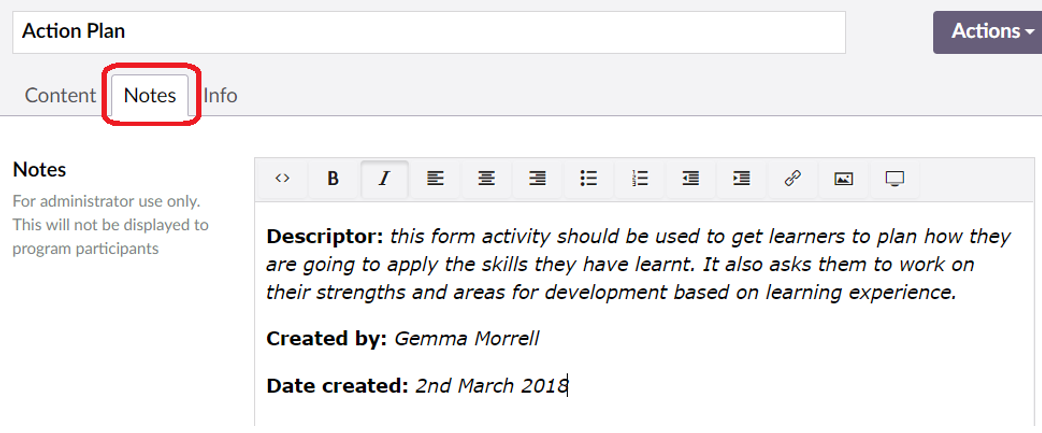
This is particularly useful for the activity repository, as it means that you can add a comment to your activity before sending a copy to the repository, so that other administrators can view this comment when sending a copy to their program. You can enter any text into this field, however we suggest that, as a minimum, you add a high-level descriptor about the activity, in addition to your name and the date of creation.
The reasons behind this are:
- Descriptor - assists those viewing your activity from within the repository to understand what the activity could be used for and decide whether it is suitable for their program
- Creator name - if there are multiple administrators in your organization, it would be helpful for those who are copying your activity into their program to know who the activity was created by. This means that they can contact you if they have any questions
- Date of creation - helps to check whether any information could be "out of date" (e.g. new products/pricing). This date could be the actual date of activity creation, or the date that the activity was sent to the repository
Adding Activities from the Repository
Locate the repository in the curriculum structure and click the small arrow to expand it to show the repository folders. You can then expand each of the folders to view the activities within them.
If you find an activity that you think would work well in your program, select it and then go to the ‘Actions’ dropdown in the top-right corner.
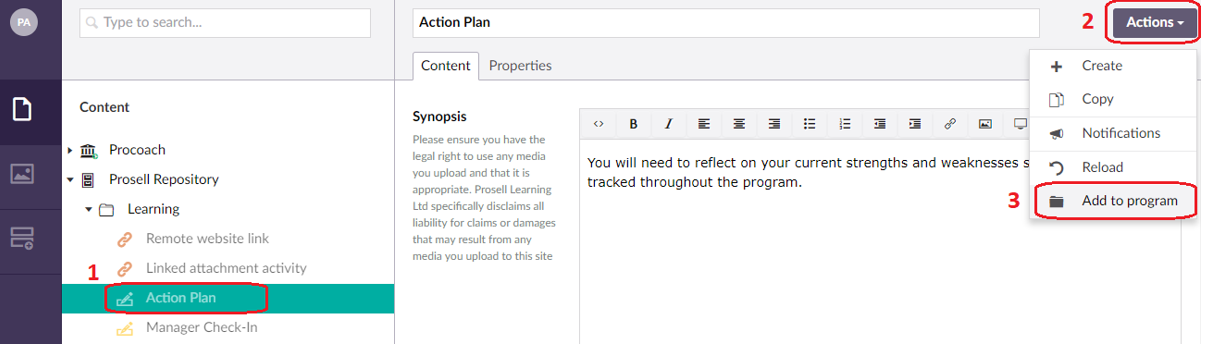
Click ‘Add to program’ and then select the location in your curriculum for it to be positioned within.
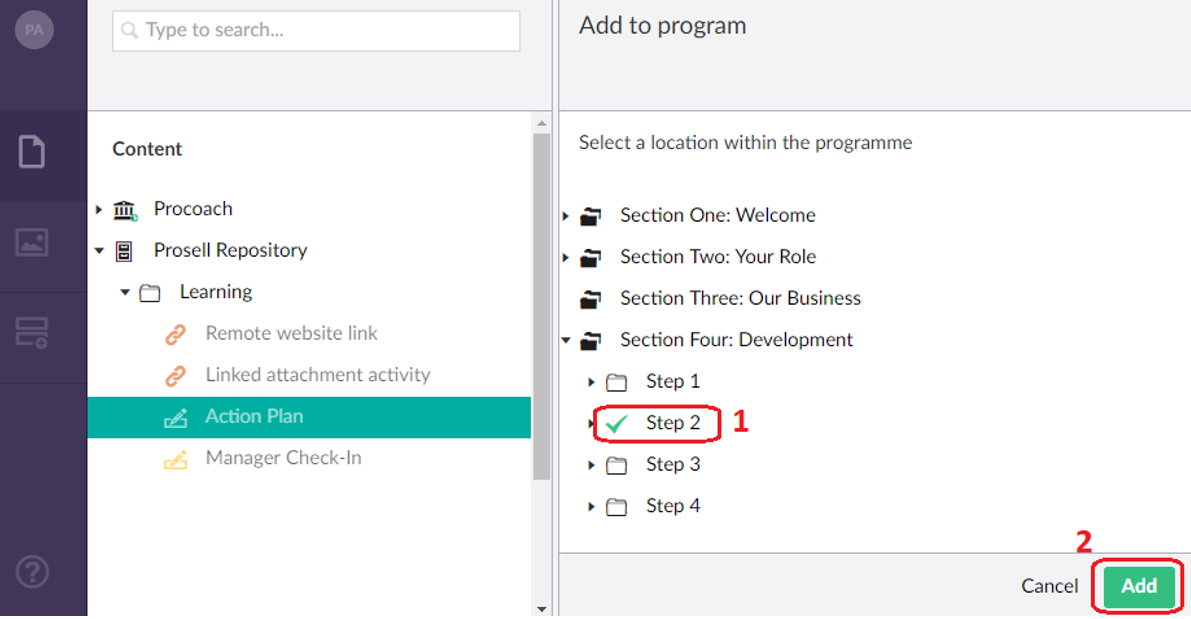
The activity must be positioned within a step - if you select a section then you will get an error message “The current node is now allowed under the chosen node because of its type”.

When you retrieve an activity from the repository and add it to your program (in a section and a step), you are taking a copy of that activity. Therefore, you can make changes to that activity for your own program and these changes will not be applied to the activity within the repository.
Comments
0 comments
Please sign in to leave a comment.