
For each report there are various filters available that allow you to limit the data to display all and only the information you are interested in. The benefit of narrowing down large amounts of data is to make it more understandable when quick analysis is needed.
Here are some examples of how you could use filters:
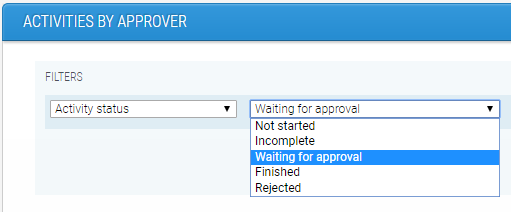
1. In the report 'Activities by approver' you could filter to show you all activities with the status 'Waiting for approval'. This would be useful because you can easily identify the individuals who are responsible for reviewing and signing off an activity who may have forgotten to do so. This is particularly important if any of these activities are set as gateways because the learner will be prevented from moving onto the next section in their program until they are approved.
2. In the report 'Learner overview' you could filter to show you learners who have completed less than x% of their program. This filter would be useful if the learners in your program should have reached a certain stage, as it will identify those who may have fallen behind.

3. Remember you can add multiple filters by clicking 'Add filter' to narrow down your search even further.

Click here for more information on the different reports available and other suggestions on filters you could use.
Comments
0 comments
Please sign in to leave a comment.