
The aim of these enhancements is to improve the user experience related to the performance hub.
1. Notifying "Feedbackers" of Activity Completion
The objective of this feature is to invite non-approvers to support their learners in a more active manner.
When building out activities there are various form fields that need to be set. You will be familiar with the ‘Approve By’ field, which is where you select the relationship type that is responsible for signing off activities (they are asked to review and approve/reject upon completion by their learner). Once their learner has completed an activity where an approval is set, those with this specified relationship type will receive an email notification asking them to review the activity and approve or reject.
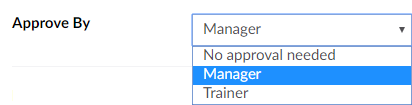
We have added another field for ‘Feedback By’, which is where you can select other relationship types (members of the performance hub) who will also be notified upon their learner’s completion of the activity and are invited to review and give feedback, but this has no effect on the activity completion status. There will be a link in the email they receive that takes them to the activity overview page to review and then any feedback can be left in the ‘Comments’ section at the bottom of the page. Comments made by these ‘feedbackers’ will be highlighted to display their importance.
To set the ‘feedbackers’ for an activity, select the type from the dropdown list.

Then, click the green ‘Add’ button on the right to confirm your selection.
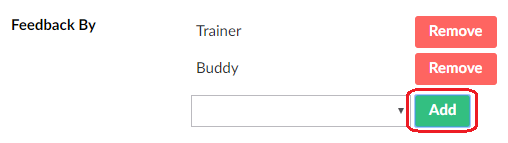
Whilst only one relationship type can be set for the approver (‘Approve By’), you can set multiple to be notified to give feedback.
The options that appear within the dropdowns for ‘Approve By’ and ‘Feedback By’ are determined by the relationship types you create when you first set up your program (through 'Program hub setup' > 'Configure relationship types').
The screenshot below shows an example of the relationship types that have been configured for a program. You can see that both the Manager and Trainer have the capability to ‘Approve’ and ‘Feedback’, the Buddy only has ‘Feedback’ and then the Director only has ‘View Progress’.
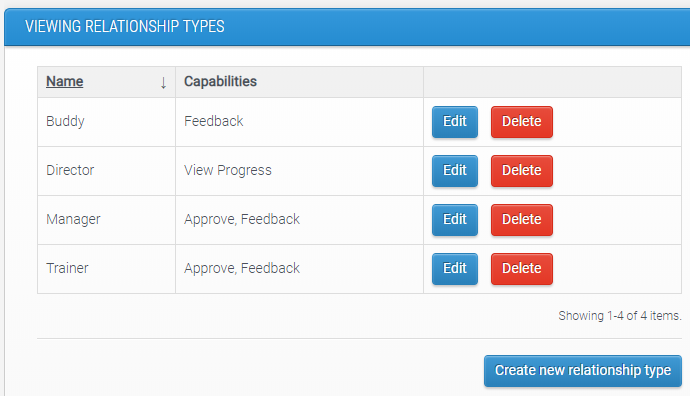
So, when creating activities in this program the only relationship types that will be available to select in ‘Approve By’ are Manager and Trainer.
Then, in the ‘Feedback By’ dropdown these types are listed but the ‘Buddy’ is also available to select. The Director role appears in neither dropdown as an option because those with this relationship assigned can only view the progress of their learners.
Once a learner completes the activity, those who have this feedbacker relationship with the learner will receive a notification informing them it has been completed and they should review and give feedback if necessary.
2. Ability to see WHO approved an activity and WHEN
The objective of this feature is to improve visibility of who has signed off (approved/rejected) an activity.
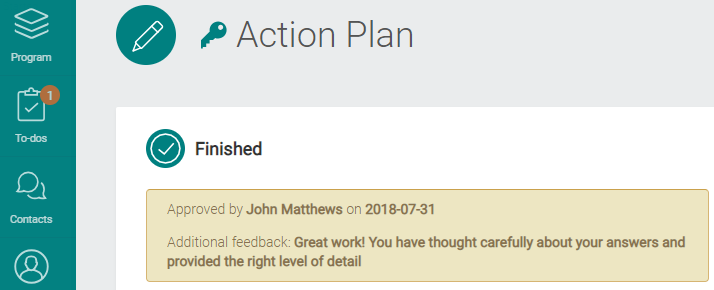
Text has been added to activities that have been approved or rejected to inform the learner, as well as other members of their performance hub, who made the action and when it was made. The reason for this addition is for cases when the learner has multiple contacts in their performance hub and so it needs to be made clear who has made this action and left the feedback.
Comments
0 comments
Please sign in to leave a comment.