
What is Timeline Management?
As outlined in the article on 'Previewing the curriculum', when you add a user to a program into a role that 'has a curriculum' (e.g. learners or admins), they are given the version of the curriculum as it stands at the time of enrolment.
Any changes that are made to the curriculum after enrollment will not automatically be pushed to this user. Only users that are enrolled after the changes are made will see them, unless you actively apply changes to their timeline. These changes are referred to as Timeline Management and we will be exploring the different methods you can use.
There are various ways of getting existing learners (those who have already started their program) to see certain curriculum changes and it is important that you understand these methods fully before using them, as the right one will depend on the situation and what you are trying to achieve.
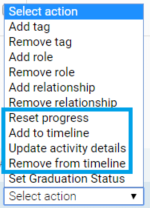
The four ways that you can manage a learner's timeline are as follows:
- Reset progress (resets any progress made and updates curriculum to the latest version)
- Update activity details (updates SOME activity details in the curriculum of existing learners without affecting their progress)
- Add to timeline (adds activities to curriculum of existing learners without affecting their progress)
- Remove from timeline (removes activities from the curriculum of existing learners without affecting their progress)
These actions can be applied using the multi-action tool. How to use them will be covered in the next articles (linked above). Please ensure you fully understand these functions before applying them to live participants as there's a risk of losing progress.
Comments
0 comments
Please sign in to leave a comment.