
On Saturday 21st September, we implemented some changes to the way that participant tags are structured in the database.
The key difference you will notice as On.Board administrators following this change is that when assigning tags to participants using the multi-action tool, you will be required to give each tag a tag family (you may recognise this term if you have used grouping in social activities).
This structure is already leveraged in the participant bulk upload, where additional columns in the spreadsheet are used to give tags, with the column headings being the tag families (categories) and the tags in the fields below.
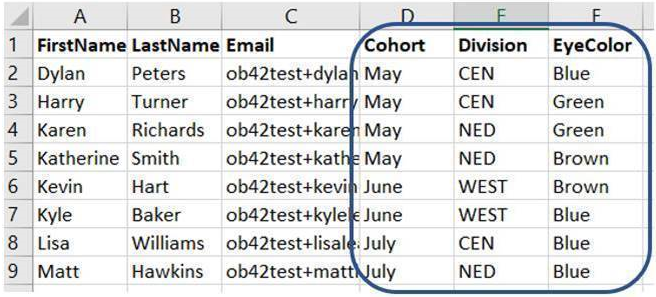
So, using the example presented above, the tag families are Cohort, Division and EyeColor – all participants receive various tags within these families. Dylan Peters would get the tags ‘Cohort:May’, ‘Division:CEN’ and ‘EyeColor:Blue’, whilst Karen Richards would get the tags ‘Cohort:May’, ‘Division:NED’ and ‘EyeColor:Green’.
This is currently inconsistent with the alternative method of assigning tags, through the multi-action tool, as here you can give tags without a family.
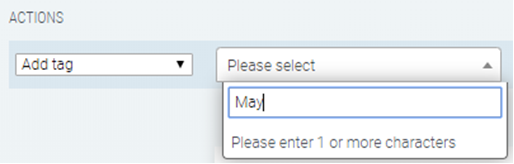
It has come to our attention that the absence of a tag family could result in issues with grouping in social activities. Therefore, the ‘Add tag’ action in the multi-action tool will be modified to enforce the allocation of a tag family to all tags, to give better structure and eliminate the inconsistencies that currently exist.
Comments
0 comments
Please sign in to leave a comment.