
The Importance of Chunking Your Content
Research on knowledge retention has found that the human brain can get quickly overwhelmed when too much information is processed at once. Therefore, by breaking down your content into bite-sized chunks, in the form of interactive activities, you can ensure that learners retain all necessary information whilst keeping them engaged at the same time.
So, assuming you have an empty curriculum, the first job is to work out how you are going to chunk your beautifully prioritized, ordered and objectives-relevant learning content using sections, steps, and - later - activities.
Before reading ahead, take a look at our administrator How-To article on Sections and Steps for more information if you're not already familiar with the process of creating these.
Sections
There are many ways that you can choose to structure your curriculum, and this will depend on the type of program you are building and its purpose.
A traditional learning program might have just three sections - Introduction, Learning Content and Test/Application. If there's too much 'Content' for just one section, you can still maintain the "three-ness" by chunking your curriculum into sets of three, for example:
- Introduction
- Learning Content area A
- Test/Application
- Introduction
- Learning Content area B
- Test/Application
- Introduction
- Learning Content area C
- Test/Application
- Introduction
- Learning Content area D
- Test/Application
We recommend that you do not have too many sections. If you find yourself with an inordinate number of sections, it could be time to ask yourself if the subject matter warrants more than one program. Alternatively, that might be a prompt for you to re-evaluate the length of time you're expecting your learners to devote to the program.
Steps
While steps are visible to administrators when creating them in the back-end, their function in the front-end is more subtle. Steps are used to "chunk" learners' to-do lists so that they don't get overwhelmed by too many tasks they need to complete. Think of steps as being a way of releasing the next batch of activities.
Check out the screenshots and videos in our how-to articles if you're unsure how they work - or, better still, experiment with different configurations in your own curriculum. If you decide to experiment, we recommend just creating some minimal (text) activities - simply with a title and a single word in the synopsis - to act as placeholders. You do not need fully built out activities for the purpose of testing which step configuration works best for you.
Each time that you make a change to the curriculum and need to preview how it looks from a participant's perspective, you need to refresh your timeline. Click here for information on this.
Next, we move onto the different options you have with activities and how to build them.
Activities
Building your Activities
You should now have a better understanding of chunking your content with sections and steps and have a few built out in your curriculum. If you haven't been able to do this and require some assistance, please get in contact.
Activity Types
Before you create the activities to go within these, you need to decide which of the six activity types are best suited for the information you want to get across and will enable learners to meet their learning objectives. You can find a description of the activity types here.
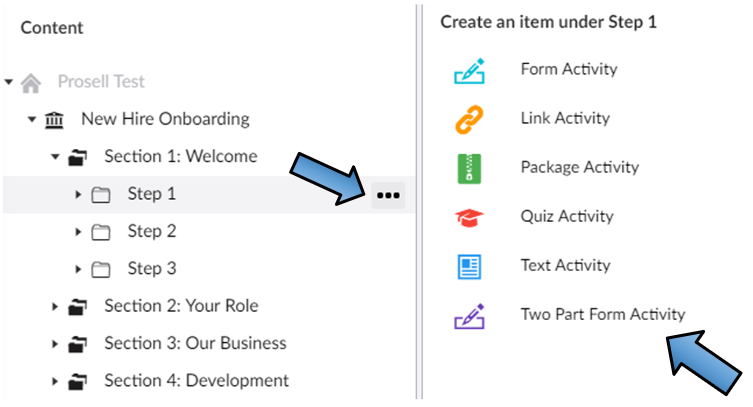
The activity type you choose will depend on what you want the learner to do.
Here are some ideas to get you started with the different activity types:
- If you have words or images you want your learner to go through, then you might start with the simplest type, a TEXT activity. Images can be inserted through the media picker and attachments can be held within the 'Related documents' section. Try not to have too much text and, if you're expecting to deliver to different devices (smartphones and tablets, as well as laptops and desktops, for example), please check that your work looks OK on them all (this applies to all activity types, not just 'text')
- Although you can add hyperlinks and related documents in a text activity through its synopsis, if you want to track whether your learners visit the extra content, you should use a LINK activity. Link activities come in two flavours: 1) you can link to an external website page by inputting a URL; and 2) you can upload a file/document
- If you want to check your learners' understanding of your materials, and we advise that you do this frequently if your learning objectives require recollection of knowledge, then you can use a QUIZ activity. Multiple choice questions are a great way of testing your learners, providing feedback and, if you get them right, can be good fun too
- A FORM activity is super-versatile because you can do so many different things with them, including asking questions where, unlike quizzes, there may not necessarily be right and wrong answers. Instead, they can be used to elicit opinions, encourage self-reflection, administer surveys or questionnaires, ask for evidence by allowing learners to upload their own files, and so on. This activity type is useful when your learning objectives involve your learners being able to demonstrate the application of a learned skill, as through forms they can upload evidence in the form of an image or video. Additional value can be added with a TWO-PART FORM activity as there is a second part with questions aimed at the approver of the activity, to prompt them to give targeted feedback to the learner. For example, "What would you suggest your learner adds to their action plan as an area they could improve on?"
- If you have some SCORM-compliant content - be it e-Learning, a game, a simulation, a test etc. - you can include this in the system using the PACKAGE activity type
Please note that you can change activity types if you decide further down the build process that a different type would be more effective.
It's not just the type of the activity that needs to be considered, but also the content/appearance/settings of an activity. You can find out more about these content fields here.
Comments
0 comments
Please sign in to leave a comment.